
mvn archetype:generate -DarchetypeGroupId=org.faktorips \
-DarchetypeArtifactId=faktorips-maven-archetype \
-DarchetypeVersion={faktorips-version} \
-DgroupId=org.faktorips.tutorial -DartifactId=basemodel \
-Dversion=1.0 -Dpackage=org.faktorips.tutorial.model -DJavaVersion=21 \
-DIPS-Language=en -DIPS-IsModelProject=true -DIPS-IsProductDefinitionProject=false \
-DIPS-SourceFolder=model -DIPS-RuntimeIdPrefix=base. -DIPS-ConfigureIPSBuild=truePartitioning of Models with Faktor-IPS
Creating the Models in Faktor-IPS
In the following we will see how to represent this separation in Faktor-IPS. The basic concepts and usage of Faktor-IPS will not be covered in detail here; these are explained in the Faktor-IPS introductory tutorial.
Creating the Base Model
For the base model we create a separate Maven project using the Maven archetype:
The model is modelled according to the following UML diagram, noting that the classes must be marked as abstract, since the line-specific logic is only implemented in the subclasses of the line-specific models.
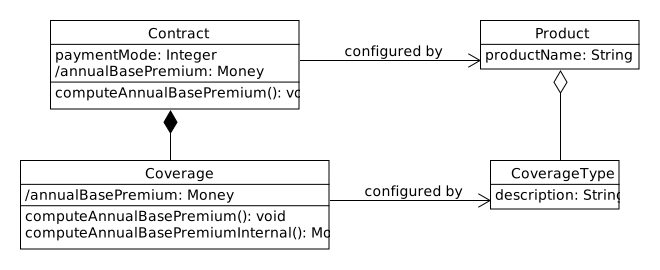
Figure 1. UML Diagram Base Model
Creating the Home Model and Inheriting from the Base Model
For the home contents and motor vehicle lines of business we create separate projects in which we model the line-specific properties. This is illustrated below using the home contents line-specific model as an example.
We create the home model Maven project analogously to the base model:
mvn archetype:generate -DarchetypeGroupId=org.faktorips \
-DarchetypeArtifactId=faktorips-maven-archetype \
-DarchetypeVersion={faktorips-version} \
-DgroupId=org.faktorips.tutorial -DartifactId=homemodel \
-Dversion=1.0 -Dpackage=org.faktorips.tutorial.homemodel -DJavaVersion=21 \
-DIPS-Language=en -DIPS-IsModelProject=true -DIPS-IsProductDefinitionProject=false \
-DIPS-SourceFolder=model -DIPS-RuntimeIdPrefix=home. -DIPS-ConfigureIPSBuild=true
To be able to access both the IPS model and the generated Java code of the base model from within the home model, we add a Maven dependency on the base model to the pom.xml of the home model:
<dependency>
    <groupId>org.faktorips.tutorial</groupId>
    <artifactId>basemodel</artifactId>
    <version>1.0</version>
</dependency>
The home model is modelled according to the following UML diagram, where the classes on the left side are modelled as policy component types and those on the right side as product component types:
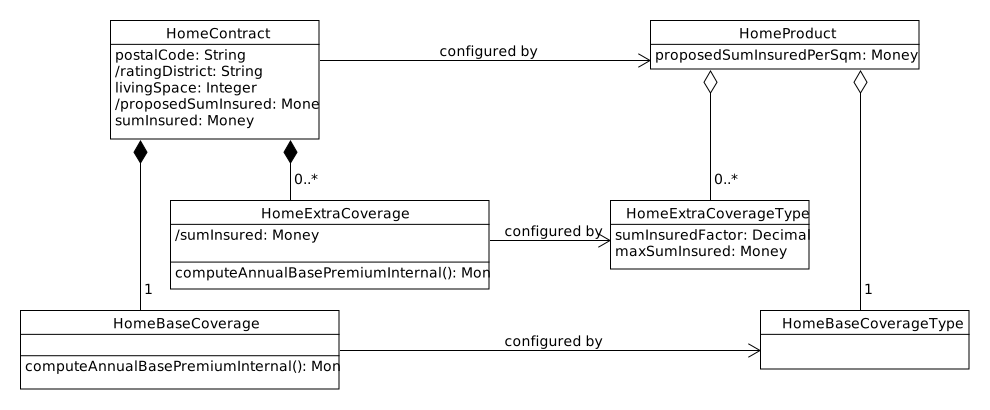
Figure 2. UML Diagram Home Model
Since HomeContract should also inherit the properties of the Contract class (e.g. the attribute paymentMode), we enter the corresponding superclass from the cross-line model in the dialog when creating each class. For HomeContract this looks as follows in the editor:
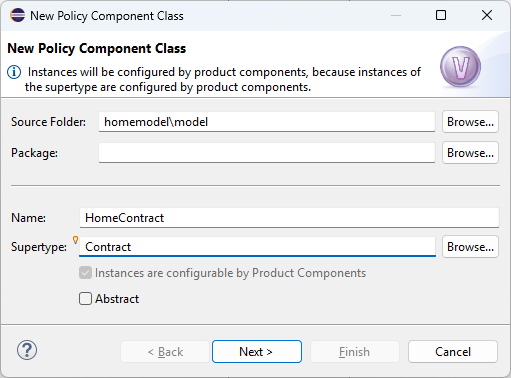
Figure 3. Inheritance Contract - HomeContract
The further inheritance relationships between classes of the base model and the home model are created according to the following UML diagram:

Figure 4. Inheritance Relationships between Base Model and Home Model