
English Documentation
Release Notes
Version 26.1.2
With Product Designer 26.1.2, a bug was fixed (PD-2534) that in certain constellations caused an error during search.
Version 26.1.1
With Product Designer 26.1.1, the Faktor-IPS version was updated to 26.1.1.release. The update of Faktor-IPS fixed an error that prevented product components from being created if they contained overridden multi-value attributes set with the hide flag.
Version 26.1.0
Product Designer version 26.1.0 introduces new features, numerous UI improvements, and bug fixes compared to 25.7. The main focus of this release is the new Tasks feature, improved documentation support in the UI, and enhancements around enums (display as well as import/export).
New Features and Improvements
Tasks
Product Designer has been extended with Tasks. Tasks support a simple workflow from creation to completion:
-
Tasks start in status
OPENwhen created and can be edited. When work on a task begins, the status changes toIN_PROGRESS(PD-2035). -
Tasks can be set to
READY_FOR_REVIEW, Once they are ready to be reviewed(PD-2044). -
Tasks can be reviewed: During the review process, the task is in status
IN_REVIEW. (PD-2261). -
Tasks can be interrupted: this pauses work so the task status is changed back to
OPENand can be resumed and edited later (PD-2062). -
After a successful review, the task can be set to
CLOSED. Closed tasks can no longer be edited. (PD-2056).
Tasks are displayed on a dedicated task overview page. From there, users can create new tasks, open existing tasks, continue working on tasks, submit tasks to READY_FOR_REVIEW, and track tasks currently in IN_REVIEW.(PD-1950).
Note: Tasks are not available in local mode.
Improved Documentation in the UI
The documentation experience has been significantly enhanced:
Enums: Multi-language Display & Import/Export
-
In the table view, enums now display multi-language values (PD-673).
-
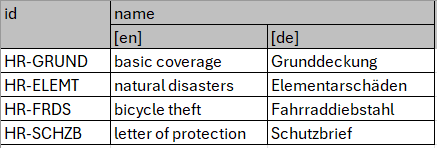
Enum import/export supports
multi-language strings(PD-1887):-
For multi-language columns, the header is displayed as two rows (column grouping + ISO codes per language).
-
Export is still possible without a header row; during import, values are assigned based on their order (as before).
-
-
When importing enum contents, an error is raised if the import file contains values that are already defined in the model’s EnumType (PD-1147).
Figure 1. Example: Export with two-line header row
| If multiple languages are configured in the project and locales are missing during import, an error message is shown and the import is aborted. |
Structure Tree: Improved Expand/Collapse Behavior
When initializing, the product tree is no longer fully expanded. Instead, only the root component and one level below it are shown. When expanding a node, only that node is opened—no additional levels are expanded automatically. In addition, new plus and minus buttons allow fully expanding or collapsing the entire tree (PD-902).
Validation: Configurable Rules as Checkboxes
Product-configured, disableable validation rules are now displayed as checkboxes (analogous to Faktor-IPS) within the corresponding category and can be enabled or disabled (PD-1900).
Additional UX/UI Improvements
-
Warning when overwriting an existing ..1 relationship or TableUsage (PD-889).
-
When adding existing components, components outside their valid-from / valid-to range are no longer shown (PD-950).
-
Basic logging added at known points (PD-1634).
-
Commit dialog: the icon of the product component type is displayed (PD-1689).
-
Bill of Materials (BOM) created (PD-1774).
-
Security settings aligned with f10-commons and Linkki recommendations (PD-1781).
-
Formula validation messages are shown below the input field (PD-1932).
Generations & Usage Analysis
Maven Archetype / Project Setup
-
The Maven archetype again generates a correct
application.ymlwhere the repository path is configured underlocal(PD-1594).
Migration from 25.7 to 26.1
A small adjustment in the permission concept is required for the migration to version 26.1:
The class ProductDesignerPermissionService has been extended with a new static factory method defaultFor(user, repository, properties) that creates an instance of DefaultPermissionService. As part of the migration, the permissionService method in the “Configuration” class should be switched to use this.
|