
English Documentation
Multi-Language Support in Faktor-IPS
Introduction
Faktor-IPS supports the ability to maintain multiple languages for IPS projects. If a project supports a specific language, all descriptions can be provided in that language. In addition, policy components, product components, attributes, and associations can be assigned a so-called label for each supported language. These labels are displayed in the product definition to make work easier for the business department. Furthermore, it is possible to maintain localized values in enumerations according to the languages defined in the project, so that these are also displayed in the product definition in the respective language.
If Faktor-IPS is started with a given language setting, the product definition will always display the description that matches the language. Likewise, instead of the names of elements in the product definition, the label that matches the language is displayed.
The command-line parameter -nl can be used to specify the language in which Faktor-IPS should be started (e.g. -nl de to start Faktor-IPS with German language settings).
|
Motivation
Preparing a Faktor-IPS model for multiple languages provides several benefits:
-
Instead of technical names, meaningful names can be displayed to the business department
-
The model can be created in a language that is independent of the presentation
-
International employees can be given access to the model
-
International product definitions are simplified
Labels and Descriptions
In Faktor-IPS, labels and descriptions can be defined in different languages for model elements (product components, product component types, policy component types, attributes, associations).
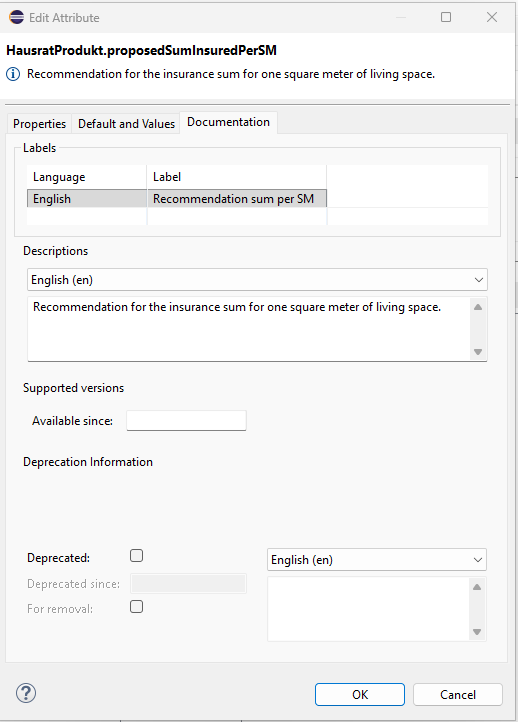
For example, labels and descriptions for created attributes can be maintained via the Documentation tab.
Figure 1. Dialog for editing label and description
The figure shows the dialog for defining labels and descriptions in different languages for an attribute of a product component type. In this example, the IPS project supports the English language (en). A label and a description have been defined for this language.
For other IPS elements (including policy components, product component types, enumerations, and table structures), descriptions can likewise be maintained via the Documentation tab.
Display in the Product Definition
In the product definition, labels are displayed instead of technical names. This significantly facilitates the work of the business department.
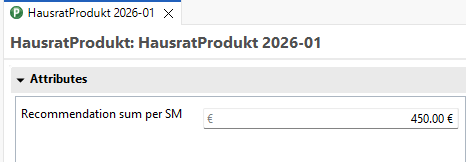
Figure 2. The product component now displays the label instead of the technical attribute name.
Adding More Languages
When creating a new IPS project, the language with which Faktor-IPS was started is initially added automatically.
| The initial language setting is taken from the Eclipse language setting when the project is created. When creating an IPS Maven project using the Maven archetype, the language package (English or German) can be defined in advance. See the chapter Archetype for further details. |
Configuring Languages in the .ipsproject File
To support additional languages, they must be defined in the project’s .ipsproject file. This is done in the <SupportedLanguages> section.
Example: Support for English and German
<SupportedLanguages>
    <SupportedLanguage defaultLanguage="true" locale="en"/>
    <SupportedLanguage locale="de"/>
</SupportedLanguages>
The language with the attribute defaultLanguage="true" serves as a fallback language when no translation is available for an element in the current language.
Activating Translations
After adding a new language, the Clean Up → Translations action must be executed via the context menu of the Model Explorer or Package Explorer. This activates the new language in all objects of the project.
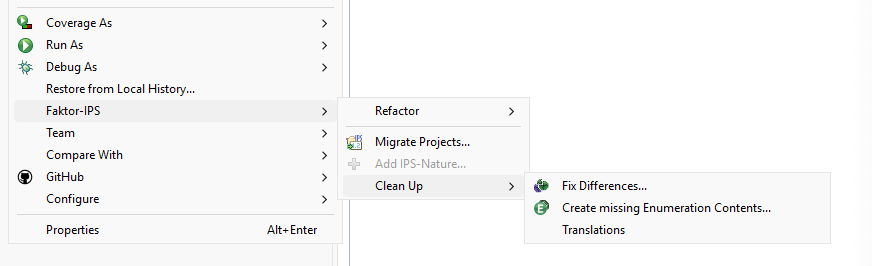
Figure 3. Cleanup, translations - context menu
Defining Labels, Descriptions, and Values for New Languages
After activation, labels and descriptions can be defined for each model element in the new language.
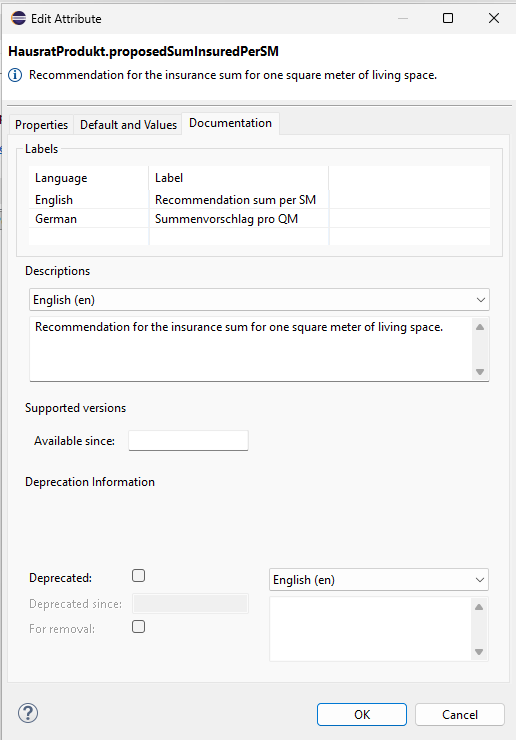
Figure 4. Defining a German label and description for the attribute
Fallback Mechanism
If a label for an element is not yet available in the current language, the fallback mechanism applies:
-
The label of the default language (defined in the
.ipsprojectfile) is used -
If no label is available there either, the technical name of the element is displayed, with the first letter capitalized
| By using a default language, it is ensured that readable names are always displayed, even with incomplete translations. |
Multi-Language Enum Attributes
In addition to maintaining labels and documentation, Faktor-IPS enables the definition of localized enumerations. Language-dependent labels can be maintained for enum values, which are displayed in the product definition according to the current language setting.
To support multi-language enum values, a multi-language string attribute is required. In the dialog for creating an enum attribute, the Multilingual Values checkbox must be activated and String must be selected as the data type.
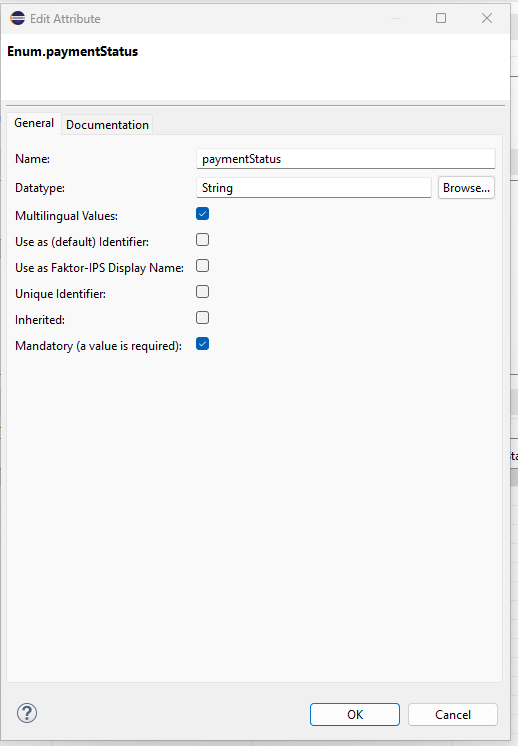
Figure 5. Dialog for creating an enum attribute
Subsequently, a localized value can be maintained for this attribute for each language defined in the project. The dialog for editing values in other languages is opened via a small button on the right edge of a multiLanguageString cell.
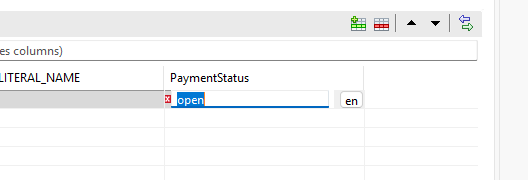
Figure 6. Click on "en" to open the dialog
The editing is then performed in the corresponding dialog:
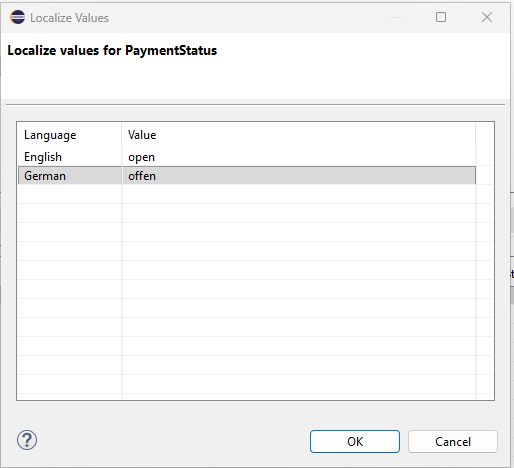
Figure 7. Dialog for editing multi-language enum values
If a multiLanguageString enum attribute is marked as mandatory, a localized value must be provided for each language defined in the project. A corresponding validation will indicate this in such cases.
|
In the product definition, the localized enum values are automatically displayed according to the current language setting. This significantly facilitates the work of the business department with product data.